Equipment model card |

|

|

|

|

|
||
|
Equipment model card |
|
|
|
|

|

|
Equipment model card
|
Equipment model card |
|
|
|
|
|
||
|
Equipment model card |
|
|
|
|
|
|
|
|
||
Graphics window Toolbar
|
|
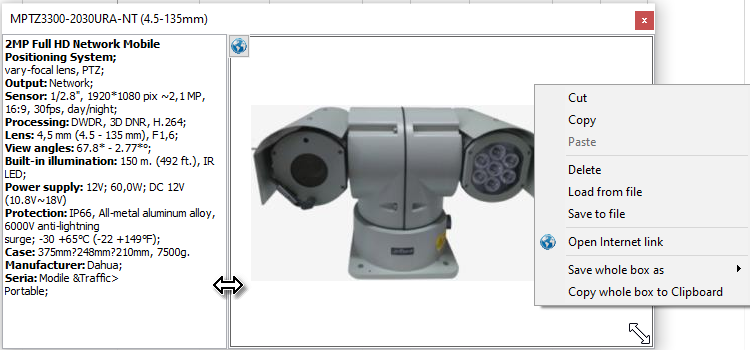
The Equipment model card box is designed to display photos and the most important parameters of model of camera, device or cable.
The box dynamically displays photos and parameters of camera models, devices and cables: active, editing, located under the cursor on the layout, or selected in tables and lists.
These parameters of camera models are taken from the Table of camera models and grouped for compact displaying. Parameters of equipment models are taken from the Specification.
The box can be opened by clicking on a cell with photo in the Table of camera models, Table of cameras, Equipment Tables or by clicking the  Equipment model card.button.
When the box was called from the tables, it dynamically displays photos from selected row of the table.
The box can be called by the Equipment model card button on the Toolbar of the Graphics window
If the box was opened by the button on the Toolbar, it shows the photo of the active camera model.
If the layout contains a device or cable in editing state, a photo of the model of this device or cable and information about this model are displayed.
And while the mouse cursor is over any camera, device or cable in the Graphics area, in the Equipment model card the photo and the basic parameters of the model under the cursor are displayed.
When the mouse cursor moves over the drop-down list of the Model of active camera, the Equipment model card opens by itself and the photo and the most important parameters of the camera model, over which the cursor is located, are displayed in it.
Using the mouse you can scale and move the image in the box, change its position, scale and move the window itself, as well as move the separator inside the window.
The size and position of the box, the position of the separator are remembered if the Keep window positions checkbox is checked. You can return the initial settings of the box using the Default window positions item.
The Equipment model card has a drop-down menu for saving, loading, copying and pasting photos, text and the card as a whole image.