Equipment numbering |

|

|

|

|

|
||
|
Equipment numbering |
|
|
|

|

|

|
Equipment numbering
|
Equipment numbering |
|
|
|
|
|
||
|
Equipment numbering |
|
|
|
|
|
|
|
|
||
Graphics window Main menu Camera Equipment numbering
Graphics window Main menu Equipment Equipment numbering |
|
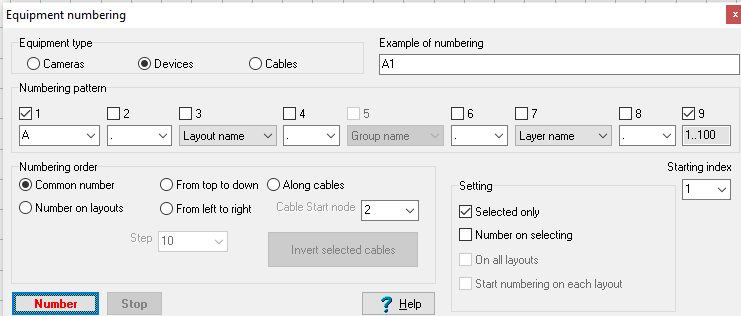
This tool allows renaming and serial numbering any quantity of cameras, devices and cables simultaneously.
Order of work:
1. Adjust Numbering pattern.
2. Adjust Numbering order.
3. Adjust additional Setting.
4. Click Number.
Numbering pattern can be adjusted by combo boxes and check boxes placed above the combo boxes. In order that position of a combo box presents in the pattern, the box above this combo box should be marked. It is possible to select variants of using the positions. In the Example of numbering box the equipment name example according to the specified pattern is displayed.
|
Equipment numbering order on layouts is adjusted on the panel.
Common number - number in equipment number increasing order all over the project. Camera numbers are displayed in the Camera list box and the Table of cameras window in the Number column.
Number on layouts - number in camera/device/cable number increasing order separately on each layout.
From top to down - number cameras/devices/cables from top to down according to their position on layouts.
From left to right - number cameras/devices/cables from left to right according to their position on layouts.
Step - numbering step on layouts when numbering from top to down and from left to right (meters or foots).
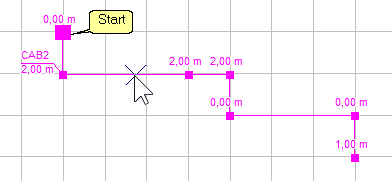
Along cables - number devices, connected to a cable in order of connection, starting from the beginning of the cable.
The beginning of cable in the editing state is marked with an enlarged grip.
Cable start node - number devices connected to the cable starting from a specific node.
The beginning of a fire alarm system loop can be connected to the control panel, which should be ignored when numbering detectors connected to the loop.
Invert selected cables - swap the start and end of the selected cables.
You may need to invert a cable when numbering along the cables, as well as to correctly fill in the fields: Start, End, Current in the wire, Voltage at the start, Voltage at the end, Voltage along the cable in the Cable Log.
|
Selected only - if the box is marked, number only selected equipment, otherwise all equipment.
Number on selecting - If the checkbox is checked, the equipment will be sequentially numbered according to the Numbering Order each time it is selected by clicking or dragging the selection window.
On all layouts - if the box is marked, number equipment on all layouts in the project, otherwise only on the current layout.
Start numbering on each layout - on each layout the numbering will be started over again. At that on different layouts in the project, equipment with identical names could be found.
Starting index - index, from which to start numbering.
|
- start numbering.
|
Stop numbering if Number on selecting is checked.
|
See also: Main menu>Camera>Rename, Selection editing panel>Edit designation, Device and Cable Modeling, Specification and Cable Log, PDF report>Equipment, Cable control box