Numerate cameras |

|

|

|

|

|
||
|
Numerate cameras |
|
|
|

|

|

|
Numerate cameras
|
Numerate cameras |
|
|
|
|
|
||
|
Numerate cameras |
|
|
|
|
|
|
|
|
||
Graphics window Main menu Camera Numerate cameras |
|
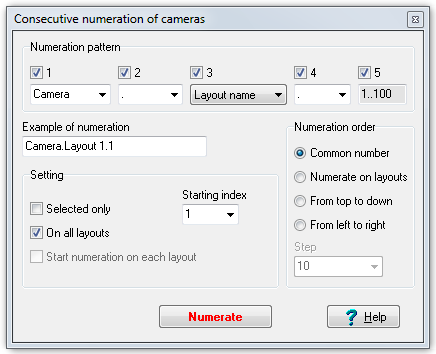
This tool allows renaming and serial numeration any quantity of cameras simultaneously.
Order of work:
1. Adjust Numeration pattern.
2. Adjust Numeration order.
3. Adjust additional Setting.
4. Click Numerate.
Numeration pattern can be adjusted by combo boxes and check boxes placed above the combo boxes. In order that position of a combo box presents in the pattern, the box above this combo box should be marked. It is possible to select variants of using the positions. In the Example of numeration box the camera name example according to the specified pattern is displayed.
|
Camera numeration order on layouts is adjusted on the panel.
Common number - numerate in camera number increasing order all over the project. Camera numbers are displayed in the Camera list box and the Table of cameras window in the Number column.
Numerate on layouts - numerate in camera number increasing order separately on each layout.
From top to down - numerate cameras from top to down according to their position on layouts.
From left to right - numerate cameras from left to right according to their position on layouts.
Step - numeration step on layouts when numerating from top to down and from left to right (meters or foots).
|
Selected only - if the box is marked, numerate only selected cameras, otherwise all cameras.
On all layouts - if the box is marked, numerate cameras on all layouts in the project, otherwise only on the current layout.
Start numeration on each layout - on each layout the numeration will be started over again. At that on different layouts in the project, cameras with identical names could be found.
Starting index - index, from which to start numeration.
|
- start numeration. |