| |
|
VideoCAD
Starter - Easy CCTV design software with 3D modeling |
|
|
VideoCAD Starter - the easiest, low cost (only
$85) version of VideoCAD.
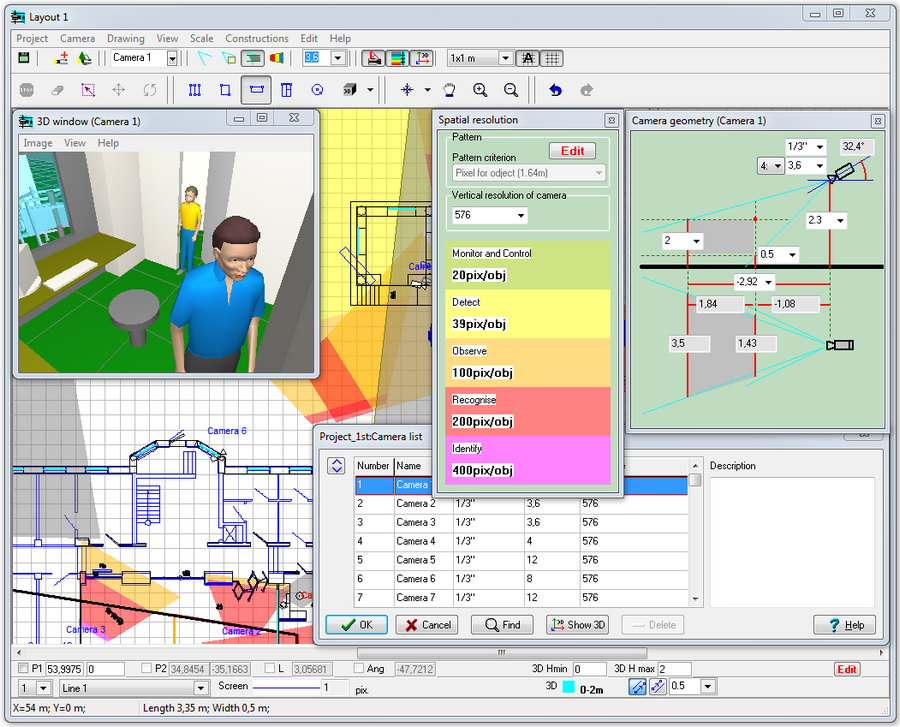
VideoCAD Starter may seem less demanding of computer resources
because of absence of resource-intensive tools.
VideoCAD Starter is registered only by personal registration code.
This code doesn't depend on computer hardware or a dongle. This
code is valid on any computer.
VideoCAD Starter can not be upgraded to more powerful Lite
and Professional versions.

|
|
| |
|
With
VideoCAD 7 Starter you can: |
|
|
|
|
Choose
the most suitable lenses, heights and locations for camera installation
to provide the required parameters of view areas.
Calculate the horizontal
projection sizes of view areas to draw them on the location
plan.
Display by separate colors different regions of spatial
resolution and field-of-view size.
Choose visually a relative location of cameras using the graphics
window with CAD interface.
Locate cameras on the prepared
layouts in *.bmp, *.jpg formats.
Obtain a drawing
containing horizontal projections of site layout with camera
images, calculated view areas, and with coordinate grid to be
used in graphical path of the project.
Export
the obtained drawing into any of the following formats: *.bmp,
*.jpg.
Copy the Camera
list with most important parameters to MS Excel, MS Word and
other software.
Construct three dimensional
models of real scenes with the possibility of loading prepared
3D models (a person, a car).
Spare
the means and win tenders due to the reduction of cameras' quantity
in projects and increase of their efficiency.
Reduce time expended and boost design quality.
Cut down the amount of controversial situations with customers
and accelerate their solution.

Download
demo |
Order
|
|
| With
the VideoCAD 7 Lite version you can in addition: |
|
Use
more than 30 additional constructions and CAD
tools (Point, Horizontal line, Vertical line, Line segment,
Angle, Double line, Arc, Mask, Filling, Text, 3D image, Inclined
rectangle, Change installation height, Change view area upper
bound, Change view area lower bound, Copy, Copy with base point,
Cut, Cut with base point, Paste, Scale, Mirror, Change line
type, Hide camera names, Cameras over constructions, Bring to
front, Send to back, Hide, Align, Combine in block, Destroy
block, Find text, Hidden state of objects, Numerate cameras,
Length calculation of line segments ).
Use up to 10 layouts
in each project.
Model cameras with non
standard image sensor size and aspect ratio.
Use up to 30
spatial resolution patterns in each project. Each pattern
can contain up to 10 regions. Adjust object
height in the patterns, height of measuring spatial resolution.
The Spatial resolution box contains models of images for each
region in current pattern.
Use gradient color and hatching for visualization of spatial resolution.
Locate cameras and cables on the prepared
layouts in *.emf, *.wmf, *.png, *.gif, *.tif, AutoCAD *.dwg,
*.dxf formats. To import *.dwg and *.dxf files the CAD Import
module by CAD Soft Tools http://www.cadsofttools.com is used.
Work with vertical
projection of the site plan.
Use Titles è texts on the drawing. Different fonts are supported.
Copy
and Paste
cameras and constructions.
Show view area projections by different colors and hatch styles,
using different line types. Use different camera
icons ( fixed, PTZ, outdoor..).
Print
the obtained drawing on one or several pages. You can use prepared
frames with standard title-block and logo.
Export
the obtained drawing into any of the following formats: *.emf,
*.wmf, *.png, *.gif, *.tif, AutoCAD *.dxf (R14), AutoCAD *.dxf
(R2000).
Obtain a text
file with full description of all cameras in project, view
areas and cables to be pasted into a project explanatory note
or used as instruction for installation.
Use many 3D models (people, cars, bus, furniture, turnstile,
tree, grass). You can add other 3D models from 3ds max and Google
Sketchup.
Print
image in 3D window. Use titles, test chart EIA1956 in the 3D
window.
Design operator interface using the Monitor
window.
Calculate the length and electric parameters of cables.
Adjust
keyboard
shortcuts for each item in the Main menu.
Adjust
visibility
of buttons on the Toolbar.
Download
demo |
Order
|
|
| With
the VideoCAD 7 Professional version you can in addition: |
|
Choose
the most suitable lenses, heights and locations for camera installation
to provide the required parameters of view areas for detection
and identification
of a person and license
plate reading.
Calculate the horizontal projection of camera control areas
including shadows
from obstacles on the scene.
Calculate the horizontal projection sizes of person detecting,
identifying and license plate reading areas to draw them on
the location plan.
Calculate the image
size on display of any object in camera view area in percentage
of display size, pixels, TV lines and millimeters(inches in
case of Imperial format).
Calculate and model depth
of field of each camera in project.
Choose right positions and calculate control areas of PTZ
cameras.
Get detailed adjustable table
of all initial and calculated parameters of cameras in project.
Print the table or export it to *.txt, *.csv,*.rtf, *.xls, *.htm
formats.
Model observed scene
parameters (illumination, visibility limitations).
Model luminaires
considering spectrum of radiation and spectral sensitivity of
image sensors, including discharge lamps with complex spectrum
and infrared LED illuminators.
Model camera
parameters (spectral response, number of pixels (including
megapixel cameras with resolution exceeds screen resolution),
resolution, minimum illumination at known signal/noise ratio,
IRE and aperture, maximum signal/noise ratio, electronic shutter,
AGC, BLC, gamma, day/night cameras, frame rate, interlace, global
shutter and rolling shutter).
Model lens
parameters (focal length, aperture, auto iris DC and Video
Drive).
Model DVR
parameters (brightness, contrast, compression, horizontal
and vertical sharpness).
Obtain Image
Model for each camera in the project based on models of
scene and equipment. This image can be printed and saved.
Model moving
objects, camera frame
rate, create animated images with moving 3D models.
Model blur
and distortion of moving 3D models depending on camera parameters.
Maintain database
of camera models, assign different models for cameras in
project, compare models with each other.
Create animated
monitor models as html files with moving 3D models and separate
frame rates of each camera.
|
|
| Download
demo |
Order |
|
|
|
 |
|
Copyright
(C) 2003-2011 CCTVCAD Software. All right reserved |
|